Posts

Showing posts with the label Android Apps

SuperSU has been removed from the Play Store

Image
For years, SuperSU was one of the most popular root applications for Android. Chainfire, the creator of SuperSU, handed over development to CCMT in 2015. Heended his involvement with the app last year, so CCMT has been in full control of it since then. For reasons currently unknown, SuperSU has now vanished from the Play Store. Just found out that SuperSU is no longer available on Google Play Store, so I guess it is officially dead 🙄 I never get my head around the reason why CCMT bought SuperSU just to abandon it...... — John Wu (@topjohnwu) September 28, 2018 The app's Twitter and Google+ accounts for SuperSU haven't made a post since last year, the Facebook page has been inactive since March, and the official forum is currently offline. As such, it seems like the app was largely abandoned. The latest version available from APKMirror was published in January. We've reached out to CCMT for comment, but the removal was likely an automatic action by Google. The...

Download Latest http injector v4.4.0 for free browsing cheats

Image
Hey guys hope you're all enjoying the latest free browsing cheats on mtn with different vpn. Okay if you use http injector a new version was just released today HTTP Injector has just rolled out a new version today (2-oct-2018) - v4.4.0 on PlayStore. ✅ 🏮 Make sure you update your HTTP Injector to the latest version else, new config files won't be able to import. đź”° If your PlayStore is not working, don't worry, download directly from this blog and install. That's all. Click here to download . If you are new to mtn free browsing cheats see how to activate yours now.

Chrome Beta 70 adds fingerprint login support for Web Authentication, enables TLS 1.3, and more [APK Download]

Image
Chrome 69 was a massive update, as it brought a brand new interface to both desktop and mobile. Now that v69 is on stable, the beta channel has been updated to version 70. This isn't as big of an update as the previous release, but it still has a few important improvements - particularly for security. Web Authentication improvements Chrome 67 added initial support for the Web Authentication API, which allows sites to use something other than usernames and passwords for logging in. For example, you could use a fingerprint or a Bluetooth key (like the Google Titan) as the sole login method. However, the feature was limited to Chrome on desktop platforms. In Chrome 70, the API is enabled by default on Android. When you visit a site that supports Web Authentication, Chrome will prompt you to use a security key. Google says fingerprints will also work (on both Android and Macs with Touch ID), but I was unable to test that. Shape Detection API There are already a few w...

App Cloner: use multiple accounts on the same device

Image
One of the problem of App Cloner specifically noted was incompatibility with WhatsApp.  Well, the update  brings with it precisely that support, and that is a very good thing. Which means that you can now clone your what's app. If you happen to use multiple accounts for the service, for instance in the case of multiple SIMs, instead of having to go to the effort to manually switch (which can cause issues), now you can keep multiple instances installed and have each associated with its own account. Then there's no concern about missed notifications during periods not signed in on a specific account. It might be a bit niche, but that's a huge convenience. WhatsApp support isn't the only thing that's been updated. Prior to 1.4.0 apps like Chrome and Gmail would fail to work, but in the latest version they've been given some limited functionality when duplicated. The major caveat being that neither works directly with a Google account on duplicated installs, so emai...

Dangers of downloading outside Google play store

Image
There are many disadvantages of downloading outside of the google play store some poses risk of getting viruses on there device or some apps gets to breach your privacy without your consent.  1. Google security scan: Every app on the Google Playstore goes through security scan and any malicious app is immediately deleted and removed from the playstore. This makes the playstore the most secure source to get your apps and games for Android devices. Any app not on the playstore does not undergo this security scan and you have no way of knowing if it’s a good one or not. 2. Malware and virus: Most of those links you see online takes you directly to malicious sites where you can easily install spyware, malware or virus that can not only damage your device but expose your sensitive data such as contacts, bank details etc to hackers. You may even download a copy of the game that actually works on your device but does damage in the background. Malwares and spywares could use your phone cam...

Gmail app now alerts you to deleted messages from threads, gives option to view

Image
The desktop/web version of Gmail has been undergoing a lot of changes in recent months, but the Android app, in comparison, has languished a bit.  At least one feature from its desk-bound counterpart is trickling down to mobile, though. The indicator warning that messages have been deleted from a thread has made its way into the Gmail app for Android as of v 8.7.15. Before in v8.7.1 (left) ,  after in v8.7.15 (right). Now when looking at a conversation thread with multiple messages, if any of them was previously deleted, a warning will appear. This indicator can help to explain any apparent discontinuities in the thread, with an option to show the omitted/deleted message, if the trash has yet to be cleared. This isn't the most tremendous change, but it is useful if a conversation continued past when you expected it to, should you be in the habit of deleting emails. The feature as it appears on the desktop Gmail site. It's a bit different in appearance and location compared to ...

Instagram launched a Lite version of its app [APK Download]

Image
With mobile data getting faster and smartphones having larger storage, you'd be forgiven if you thought the need for slimmer and more efficient apps is dwindling. Quite the contrary, many developers are building bigger apps with overflowing features, which are not optimized enough for the lower-end devices and slower networks that are still found all around the world. To provide an alternative and avoid alienating this large user base, these developers are making "lite" versions of their apps — we've already seen this happen with Facebook, Facebook Messenger, Twitter, Uber, LinkedIn, Skype, Shazam, and all of Google's Go apps. Instagram is now joining the fold with its own Lite app. Instagram Lite takes after the redesigned mobile web app that launched last year — in fact, I wouldn't be surprised if it were just a wrapper around it because they look exactly the same. It doesn't have all of Instagram's features yet, but you can see your ti...

Pornhub made a free VPN (that's totally not just for watching porn)

Image
Adult entertainment website Pornhub has created its own VPN service.  VPNhub (obviously) is available on Android, iOS, Windows, and macOS, and even has an ad-supported free option for mobile. As free VPNs are becoming increasingly rare (another one bit the dust just last month), it could be worth your consideration. VPNhub's website and app listing both politely avoid any cheeky reference to the service's parent company, although its logo and color scheme will probably look familiar to some readers. Its site says the VPN is "totally free" and offers "unlimited bandwidth on your device of choice" — but the paid option offers faster connection speeds; an ad-free experience; and support for multiple devices, including desktops. "VPNhub allows you to securely access your favorite apps and sites both at home and on the go, whether you’re traveling, at a local cafe, airport, campus, or office," the service's website reads. Just, you know, ...

Find My Device v2.2 adds IMEI numbers to simplify reporting of lost or stolen phone

Image
Find My Device doesn't get a lot of updates these days, and it probably doesn't need much more than it already does. However, the latest update does add a potentially valuable new feature that could make it easier to report your lost or stolen phone. You can now get the IMEI number for the device without digging up the original box or paperwork, and without having to make a point of recording the number elsewhere. IMEIs for your devices After updating to v2.2, you'll want to look for a new info 'i' button appearing at the top-right corner of the card for the phone you're looking for. Tapping on that button will open a pop-up containing a the name and IMEI of the device, along with the date it was first registered to your account and when it was last seen – but note that the 'last seen' date coincides with... I'm not sure, but I assume it's when the device last checked in with the Play Store? While a serial numbers are often prefe...

Opera introduces Opera Touch, a cool new mobile browser

Image
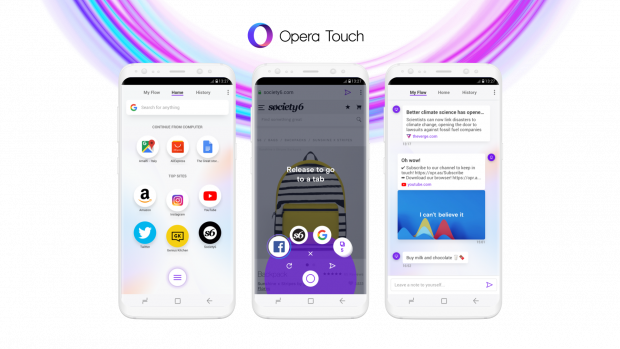
Hi all. Opera browser has built a new browser that has the ability to connect to your laptop while you are browsing on your mobile device. According to Opera,  We are really excited to come to you with a new product our team at Opera has been hard at work on. Opera Touch is a brand new mobile browser. We have designed it to be used on the move and with just one hand. It also makes the mobile and desktop web browsing experiences into one with a feature we’ve named Flow. When we started working on Opera Touch, we realized we needed to bring you a browser designed from the ground up and which fits the way you actually use the web: on the move. We also wanted you to be able to easily move content between your smartphone and your laptop. That’s why, today, we are also releasing a new version of the Opera browser for computers which Opera Touch seamlessly connects with. Editors Pick: See how Opera news gives free airtime on all Network   Also; See how to get free airtime on ...

Truecaller now has over 100 million daily active users who don’t care about privacy

Image
Truecaller, the popular caller ID app, now has more than 100 million daily active users as announced by the company in a blog post. It is a major milestone for a mobile-only product that was first launched in 2009 for BlackBerry devices of the time. While Truecaller started as a caller ID and spam-blocking service, it has evolved into a full-fledged communications platform with calling, messaging, and payment services over the few years. Some, like me, though feel that it has become too bloated for the primary use case that made it almost ubiquitous in some markets. The success of the Truecaller piggybacks on emerging markets like India where spam calls are a major nuisance and privacy concerns are low. Most people don’t mind sharing their entire contacts list to gain the benefit of identifying callers and avoiding spam calls. India is a huge market, and the criticism from users in other countries is countered by the large user base in India and other emerging markets. ...

5 best PSP emulators for Android

Image
Hi game lovers, today lets discuss on some consoles by which you can play play station games or sega games on your android, this consoles are known as emulators and are used to play most PlayStation games on Android etc. We have the following below. AwePSP Price:  Free AwePSP is pretty simple as far as PSP emulators go. You start it up, select a game that you downloaded, and then you play the game.  Like most in this genre, there are some compatibility and performance problems based on which game you're trying to play. Aside from that, it supports the basics such as save states, hardware controller support, and a range of file extensions for games. It's not as good as PPSSPP (and some even claim that this is a clone), but this is a good free option for those testing the waters. DOWNLOAD ON GOOGLE PLAY   Editors pick; Download Pes 2018 Android Matsu Emulator Price:  Free / $9.99 We're calling our shot a bit with this one. Matsu Emulator doesn't actually supp...

Opera Browser Beta adds night mode in latest update [APK Download]

Image
Opera is one of the most popular alternatives to Google's own Chrome browser and with good reason. It blocks ads, saves data, and has an excellent reader mode. There's also Opera Mini for an even faster, lighter experience. Another reason for Opera's popularity is active development. Already this year, in a reaction to an increasing fear among users, a crypto-mining blocker was added to both versions. Editors pick: How to get free airtime for all Networks via Operanews The main mobile browser has a separate Play Store listing for its beta version, and a new update has just been released for it. There are two additions to note: a night mode and a private mode indicator. Since dark themes are very fashionable right now we can expect the first of those to go down very well with users. You can activate night mode with a little toggle in the Opera menu, just underneath the option for blocking ads. It can also be fine-tuned in the settings, where you can cha...

SwiftKey adds new exclusive Halo sticker pack and Skype emoticons

Image
In a world full of ways to express oneself, sticker packs and emoticons remain some of my favorites. Being a user of Telegram, I often take advantage of the stickers there (my favorite is the Geralt of Rivia/Witcher pack). SwiftKey is continuing to add new features via its Toolbar. Now users can look for two new items: a set of emoticons from Skype and a Halo sticker pack. There are twenty-four animated emoticons to choose from, adding a bit more personality to otherwise static emojis. Heavy Skype users, current or former, should appreciate what's on offer here. The Halo pack includes eight stickers, and some of them are even animated. But there is a part of the announcement blog post that just reads funny: "The new Halo stickers make it easy to bring your passion for the game from your Xbox to your phone, giving you a new way to engage with your friends and opponents right from your device." As a long-time, though recently-diminished, Halo fan, th...

How to make your Android Flash when you get a Call or Sms

Image
With this basic trick, you are going to learn you can make your Android Device to perform in such a shrewd path without the typical clamor or sound when you get a SMS or approaching calls. .. by making the LED streak go off. This app is of great use, if you don't wish to put your phone on silent in some occasions, you can use this app which only blinks your Led light. Related: How to make your Android device respond faster The description of Flash Alerts 2 LED Flash notify! [main functions] - When you receive a call, new  text  message, the flash will blink. - You can regulate blinking frequency. - You can set up blinking with ON/OFF in detail. - A StatusBar notification is arrived, the flash will blink.(Pro) - You can turn ON/OFF the feature over the device's status. (Ring, Vibrate, Silent, In an interactive state) (Pro) - You can schedule DND when to start, when to end. (Pro) Download the app here   Click here This is the paid application, which means that ...